
Pokerrrr 2: Texas Holdem Poker
Mondraw LimitedCard
4.15.63K Reviews
- Version
- 7.7.12
- Installs
- 1.00M
- Age Rating
- Teen
Screenshots

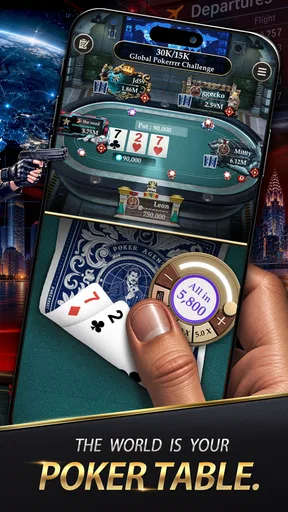

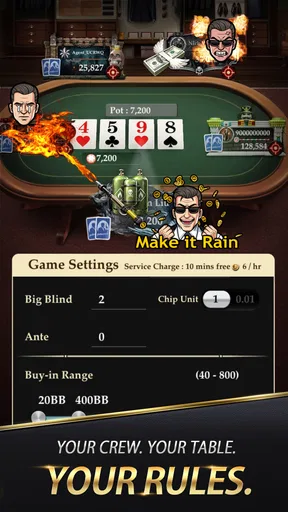

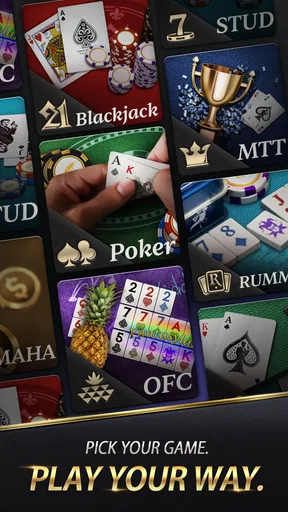


Our Review of Pokerrrr 2: Texas Holdem Poker
 Analysis by Appyee
My first question with any mobile poker game is whether it works for the kind of session I actually want: a quick game while I wait, or a table where friends can settle in and play at their own pace. Pokerrrr 2: Texas Holdem Poker is built around both options. It is a free card game from Mondraw Limited, and its private-room approach makes it feel less like a solitary phone pastime and more like a way to bring a familiar home game online.
That social focus is also the main reason I would choose it over a simple solo poker app. You can arrange a private game with friends or look for a public table, so it suits a planned get-together as well as an improvised session. It has been available since 2014, and its current version is 7.6.4; the game has a 4.1 average from around 35,000 ratings and more than a million installs. Those figures suggest an established audience, though they do not tell you whether a particular table will match your preferred pace or playing style.
A practical way to start a table
Downloading and setting up Pokerrrr 2: Texas Holdem Poker is a breeze. Once you open the app, you're greeted with a slick interface that’s both intuitive and visually appealing. The app doesn’t drown you in a sea of menus, which is a relief. Whether you're a poker pro or just getting started, you'll find it easy to navigate.
Creating your own poker room is straightforward. You can invite friends easily, and it’s as simple as sharing a room code. It reminded me of those casual home games, where everyone gathers in your living room for a night of cards and laughs. Plus, if your friends bail on you, there’s always the option to join a public game and test your skills against players from around the globe.
A realistic way to use that flexibility is to decide on the game before sending invitations. A room code solves the practical problem of getting people to the same table, but it does not make a group agree on how long to play or what kind of session they want. I’d settle the format and stakes with friends in advance, then open the room when everyone is ready. That small bit of planning avoids spending the first part of a call negotiating while players wait.
If you are joining strangers instead, treat the first few hands as a chance to learn the table’s rhythm rather than a reason to rush into big decisions. Public play is convenient when your usual group is unavailable, but it is a different social experience from a private room: you cannot assume other players want the same level of conversation or the same relaxed pace. For beginners, that makes a friendly private game a less intimidating place to get comfortable with the controls.
How the table feels once play begins
I focus on what changes once the cards are moving: how the table’s rhythm, the other players, and your own attention shape a session. I find it helps to treat the opening hands as a chance to settle in, not a cue to rush; that makes it easier to notice whether this is the relaxed friend-group game or the more unpredictable public-table experience you wanted.
Game variety and room choices
The gameplay is where Pokerrrr 2 really shines. The app allows for a variety of poker games, including Texas Holdem, Omaha, and even some unique variations. This keeps things fresh and exciting, especially if you’re the type who likes to mix things up.
What's cool is how you can customize the rules to fit your style. Want to up the ante with higher blinds or tweak the payout structure? Go for it. This level of customization is pretty rare in mobile poker apps, and it makes every game feel personal and unique.
That freedom is useful, but it works best when the host thinks about the group, not just their own preferred settings. A familiar Holdem setup is the natural choice for a mixed-experience table; introducing Omaha or a less familiar variation can be fun when everyone already understands the basic flow, but it may leave newer players feeling behind. I’d also agree on the blind and payout choices before the room opens. Custom rules are a strength only when the people at the table know what they are signing up for.
Compared with poker apps built mainly around quick public matches, the room-based setup here gives a host more influence over the shape of a session. That is a genuine advantage for a regular friend group, but it is not automatically better for everyone. If you simply want a short, low-planning match with a familiar default format, a more direct public-table alternative may be easier. If the point is to recreate a home game with people you know, having room and rule choices is much more appealing.
Settings that are worth settling early
Before inviting people, I would check the room’s rule choices and make sure they fit the least experienced player at the table. Agreeing on blinds and payouts first prevents a common home-game mismatch: one person expects a casual, low-pressure evening while another wants a sharper contest. It also makes it easier to judge whether a session will be a few hands or a longer commitment.
Voice chat can add warmth, but it is not essential to enjoying the cards. For a group that likes conversation, it can make pauses between hands feel more like a shared evening. For someone playing in a noisy place, or who prefers to focus quietly, chat may be a distraction rather than a benefit. I would treat it as a social option, not a requirement, and let the group decide whether it suits that particular session.
There is a practical trade-off in choosing the right table as well. Public games reduce the effort of organizing a group, while private rooms give friends a more controlled setting. Neither is the universal best choice: use public play when you want to get into a game without coordinating schedules, and keep private rooms for people who want a recurring table or a more personal atmosphere.
Small habits that make play smoother
For a regular group, a repeatable routine helps more than constantly changing the setup. I’d keep the same familiar format for ordinary sessions, then try a different variation on a night when everyone is in the mood to learn something new. That way, players can focus on decisions instead of repeatedly asking how the table works.
It also helps to separate the social part from the playing part. Agree on the rules and intended stakes in conversation before the first hand, then use voice chat or emojis for the banter that naturally comes up during play. This keeps the table from turning every pause into a rules discussion. If people are joining from different routines or attention levels, a clear start time and a shared expectation about session length can make the room more welcoming.
The app is most appealing to people who enjoy poker as a social activity, especially friends who want a repeatable online version of a home table. It can also work for a newcomer who has someone patient to play with. I would be less likely to recommend it to someone who wants a purely solitary card game, dislikes social features, or expects every session to be a tightly guided lesson in poker strategy. The room tools help organize play, but they do not replace a group’s own communication or teach everyone how to make decisions.
Conversation, animation, and focus
One of my favorite features is the live voice chat. It adds a layer of interaction that you just don’t get with most poker apps. Trash talk your friends or chat strategy—it’s as close to a live game as you can get without leaving your couch. The app also offers in-game emojis and animations, which can make for some fun banter during intense hands.
The graphics are sharp and the animations are smooth, which enhances the overall experience. Even the card shuffling animations are realistic enough to make you feel like you’re sitting at a real poker table. It’s all these little details that make a big difference.
For me, the best use of those extras is moderation. Voice chat and reactions can make a familiar group feel present, but they can also compete with concentration when a hand gets complicated. I’d keep the table lively during routine moments and avoid treating every animation or reaction as useful information about another player. They add atmosphere; they should not be mistaken for a substitute for reading the action.
Keeping purchases and limits in perspective
Now, let’s talk about the elephant in the room: in-app purchases. Like many free-to-play games, Pokerrrr 2 offers the option to buy chips and other features. While the app is generous with its initial chip distribution, you might find yourself tempted to make a purchase if you’re on a losing streak.
However, the app isn’t overly aggressive in pushing purchases. You can enjoy the game without spending a dime, but a few bucks here and there can enhance your experience, especially if you’re looking to host bigger games with larger stakes.
I would set a spending boundary before a session rather than decide while frustrated by a losing run. Purchases range from $0.99 to $204.99 per item, so the free entry point does not mean every optional purchase is small. If you are playing casually, try the free experience first and decide whether any purchase genuinely improves your own use of the game. Anyone who finds virtual chips encourage them to chase losses should skip spending altogether and step away when the session stops being fun.
It is also worth remembering what kind of poker experience this is. The app gives you a digital table and ways to connect with other players, but the social atmosphere depends on who joins and how they behave. A private room with friends can be warm and easygoing; a public table may feel less predictable. If you want a quiet, controlled puzzle rather than a social game, a solo card or strategy app will probably suit you better.
Finding a community without chasing rankings
Beyond the gameplay, Pokerrrr 2 fosters a sense of community. The app features leagues and tournaments where you can compete against other players for prestige and glory. It’s a great way to test your skills and meet other poker enthusiasts. Who knows, you might even make a few poker buddies along the way.
For those who love a bit of competitive edge, the leaderboards are a fantastic touch. They provide a clear view of where you stand among other players, and there's something satisfying about seeing your name climb the ranks after a winning streak.
I’d approach competitive options as a change of pace rather than the main reason to install the game. Rankings can make progress feel visible, but they can also nudge a casual player toward treating every session as a score to defend. If your goal is to learn or enjoy a friendly evening, focus on the decisions and the company instead of the leaderboard. If competition is what keeps you engaged, those modes offer another reason to return.
For a typical weekday evening, I can imagine opening a private room after dinner, inviting a few friends who are free, and choosing a familiar format so nobody has to spend time learning new rules. If only one or two people can make it, public play offers a fallback rather than cancelling the whole plan. That is where the combination of private and public tables feels most useful: it accommodates a real group’s changing availability without forcing every session into the same mold.
Who will get the most from it
The strongest fit is someone who already enjoys poker and wants the convenience of playing with friends remotely. A regular group can benefit from choosing a stable format, setting expectations before play, and using a private room as its familiar meeting place. A curious beginner can also enjoy it, particularly when an experienced friend can explain the pace and rules without pressure.
On the other hand, I would skip it if you dislike multiplayer interaction, want a game that can be enjoyed entirely offline, or are looking for a structured poker course. It is also a weaker choice for a group that cannot agree on rules or session length; the customization gives a host options, but too many decisions can make a casual meet-up feel like planning work. In those cases, a simpler poker app with a fixed format—or a non-poker card game—may be a better match.
The Teen content rating makes it important for families to think about the social setting and purchases as well as the cards themselves. I would not assume that a game being free to download means there are no spending decisions to manage. For younger players, an adult should review the purchase options and agree on boundaries before play; for any player, keeping the game recreational is a sensible rule.
Final thoughts: a better fit for a group than a solo player
So, is Pokerrrr 2: Texas Holdem Poker worth a download? Absolutely. Whether you’re a seasoned poker player or just someone looking to kill time with a few hands, this app offers a comprehensive and engaging poker experience. The combination of customizable gameplay, interactive features, and a strong community makes it stand out in a crowded market.
Give it a shot, gather your friends, and prepare for some virtual poker nights that might just get you hooked. Just remember to keep your poker face ready—even if it’s through a screen.
Verdict
Strengths of Pokerrrr 2: Texas Holdem Poker
- User-friendly interface, easy to navigate.
- Supports multiple poker variations.
- Active community with frequent tournaments.
- Customizable avatars enhance user experience.
- Cross-platform play with friends.
Limitations of Pokerrrr 2: Texas Holdem Poker
- Occasional connectivity issues reported.
- In-app purchases can be pricey.
- Ads can be intrusive at times.
- Requires stable internet connection.
- Limited free chips without purchases.
Similar Picks in This Category
View All
Solitaire - Classic Card Games
MobilityWare4.6

UNO!™
Mattel163 Limited4.3

Spider Solitaire: Card Games
MobilityWare4.6

Solitaire.com - Classic Cards
Tripledot Studios Limited4.7

Plants vs. Zombies™ Heroes
ELECTRONIC ARTS4.1

Hearthstone
Blizzard Entertainment, Inc.4.1
Frequently Asked Questions
What types of poker games can I play on Pokerrrr 2?
Pokerrrr 2 offers a variety of poker games including Texas Hold'em, Pot-Limit Omaha, and Short Deck. The app also features unique modes like OFC (Open Face Chinese Poker) and Tournament styles, catering to both casual players and seasoned poker enthusiasts. This diversity ensures that you can always find a game that suits your preferences.
Is Pokerrrr 2 free to download and play?
Yes, Pokerrrr 2 is free to download and play. The app offers in-app purchases for additional chips and features, but these are optional. You can enjoy most of the core gameplay elements without spending any money. This makes it accessible for both occasional players and those who wish to invest in premium content.
Can I play Pokerrrr 2 with friends online?
Absolutely! Pokerrrr 2 allows you to create private rooms where you can invite friends to join you online. This feature makes it easy to organize poker nights with friends regardless of their location. You can also join public tables if you’re looking to meet and play with new people.
Is Pokerrrr 2 available on both Android and iOS?
Yes, Pokerrrr 2 is available for both Android and iOS devices. It offers a seamless experience across platforms, so you can enjoy playing poker with friends who might be using different operating systems. The app is regularly updated to ensure compatibility with the latest devices and software versions.
How does Pokerrrr 2 ensure fair gameplay?
Pokerrrr 2 uses a Random Number Generator (RNG) to ensure that all card deals are fair and unbiased. This technology is standard in online gaming to maintain the integrity of the game. Additionally, the app has strict security measures to protect players’ data and ensure a safe gaming environment.
Play our best games!


